Notification settings premium
Decide which match events the bot posts in your server, whether goals show the assist, and whether notifications are rich embeds or a single compact line.
Who can use it
- Pro and Max servers can switch every event on or off and pick the message format.
- Free servers get the standard events (kick-off, goals, VAR, half time, full time, penalty shootouts and the other match status updates) and cannot switch them off. Cards and substitutions are only sent to Pro and Max servers.
The settings count for the whole server: every channel that follows a team or league with /live uses them.
Change the settings
-
1
Open the dashboard Log in to the premium dashboard and pick your server.
-
2
Go to Notification settings It is the first item in the menu on the left.
-
3
Tick what you want, untick what you don't Every event is on by default. Too many messages? Start by switching off substitutions and yellow cards.
-
4
Click Save The change applies to the next notification. You don't need to run
/liveagain.
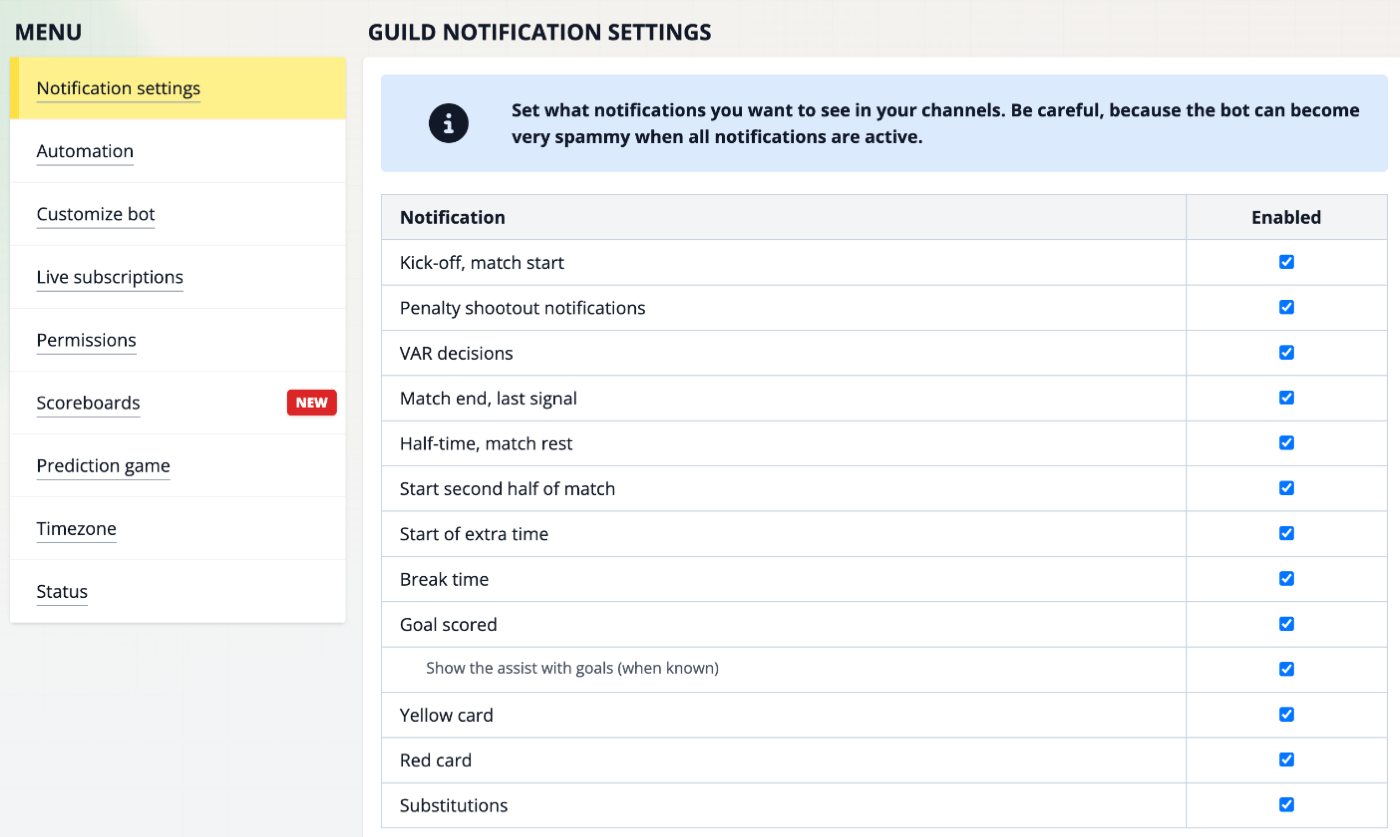
The events
| Setting | What the bot posts | Free servers |
|---|---|---|
| Kick-off, match start | 🟢 Kick-off! | yes |
| Penalty shootout notifications | 🔥 Penalties started!, then every kick that is scored or missed, with a ⚽/❌ overview per team | yes |
| VAR decisions | 📺 VAR: a goal disallowed, a penalty confirmed or a card cancelled | yes |
| Match end, last signal | 🔴 Match ended! with the final score and a link to the match report | yes |
| Half-time, match rest | 💤 Half time | yes |
| Start second half of match | 👏 Second half started! | yes |
| Start of extra time | 🕒 Extra time started! | yes |
| Break time | Break time! (the break between regular time and extra time) | yes |
| Goal scored | ⚽ GOAAAAAAL! with the scorer, the minute and (penalty) or (own goal) | yes |
| Show the assist with goals (when known) | Adds an Assist: line to goal notifications | always shown |
| Yellow card | 🟨 Yellow card! with the player, plus the referee's note when there is one | no |
| Red card | 🟥 Red card! with the player, plus the referee's note when there is one | no |
| Substitutions | ↕️ Sub with the players coming in and going off | no |
Penalty shootout notifications controls the complete shootout, separately from Goal scored. You can mute regular goals and still follow a shootout kick by kick, or the other way around.
Assists in goal notifications
Goal notifications show who gave the assist, on a line below the goal. The label follows the channel's
language set with /set-language, for example Vorlage in German or Passe décisive
in French.
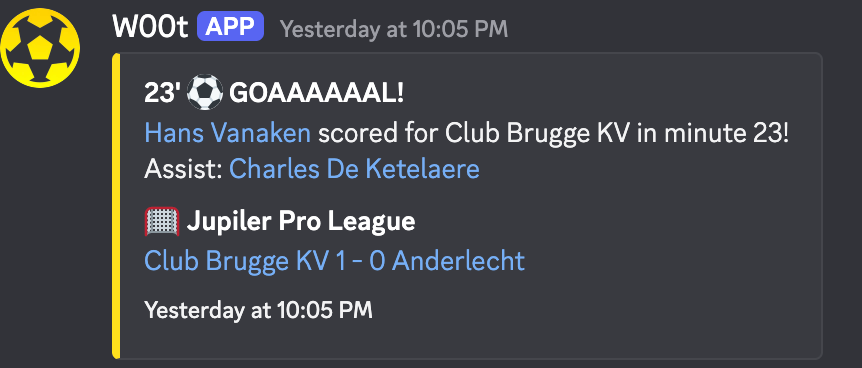
Example with test data on a Max server, so the bot uses the custom name and colour of that server.
- The assist is only shown when it is known at the moment the goal is announced. Own goals, penalties and some other goals arrive without one.
- On Pro and Max servers you can hide it: untick Show the assist with goals (when known), right below Goal scored. It is on by default.
- Unticking Goal scored stops goal notifications completely, assist or not.
One-line message format
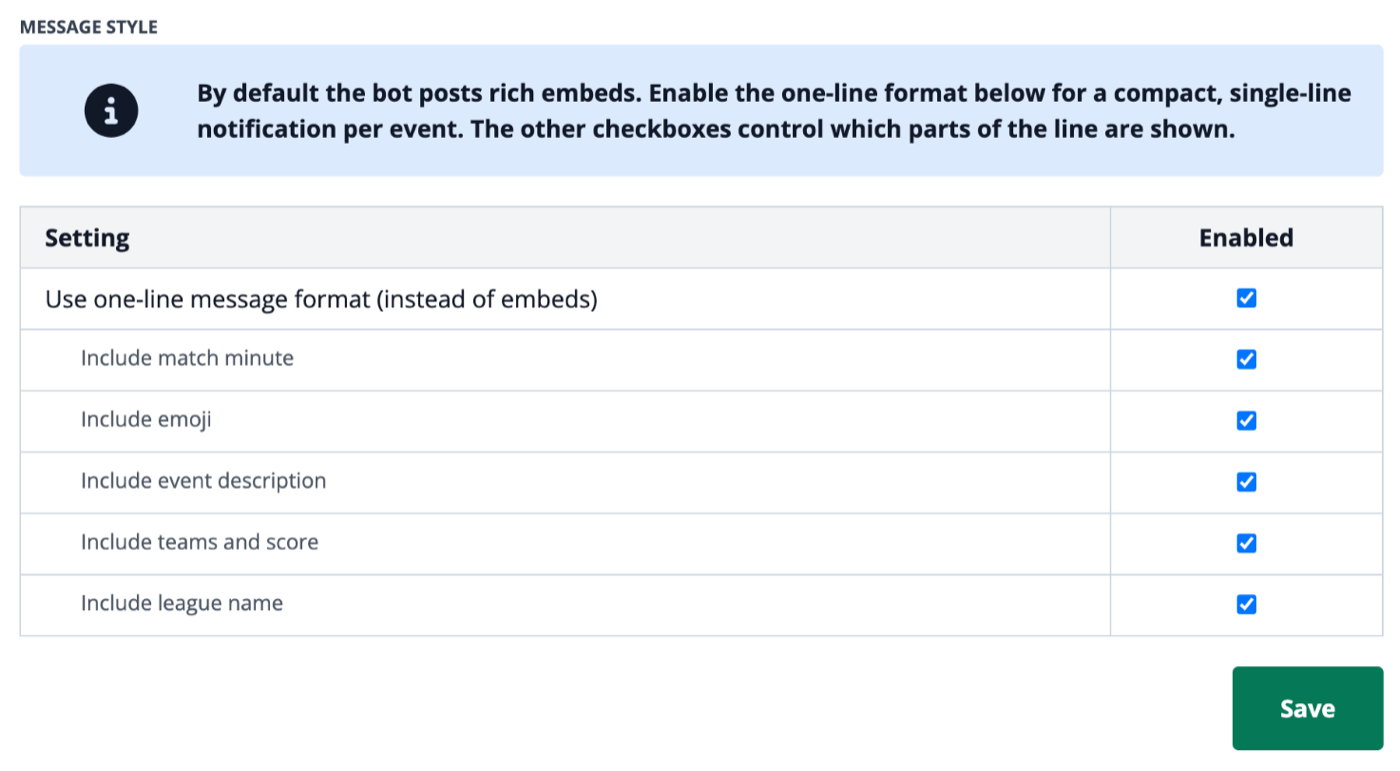
By default every notification is a rich embed with the team logo, the match and a link to the match page. In a busy channel you may prefer one short line per event. Under Message style, tick Use one-line message format (instead of embeds) and click Save.
The same goal then looks like this:

Example only: the match and the score are made up for this page.
The sub-options decide which parts of the line are shown. All are on by default.
| Option | Part of the line |
|---|---|
| Include match minute | 23' |
| Include emoji | ⚽, 🟨, 🟥, 📺 … |
| Include event description | The event (GOAL, RED CARD, SUB …) plus the team and players: scorer, assist, booked player, or IN/OUT for a substitution |
| Include teams and score | Club Brugge KV 1 - 0 Anderlecht |
| Include league name | Jupiler Pro League |
- The assist is part of the event description: untick Include event description and the scorer and assist disappear as well.
- If a role is pinged with
/ping-role, the mention comes first on the line. - If you untick every part, the bot falls back to the normal embed.
- The one-line format works on Pro and Max servers. Free servers always get embeds.
Common problems
I switched an event off but it is still posted
Check that you clicked Save and that you changed the settings of the right server. The settings work per server, not per channel. A channel with a scoreboard gets no notifications at all.
A goal has no assist
The assist was not known yet when the goal was announced, or it was an own goal or a penalty. The bot does not edit the message afterwards.
I don't see cards or substitutions
These events are for Pro and Max servers only. See the premium plans.
Related
- Follow leagues, cups and teams with
/live - All slash commands, including
/set-languageand/ping-role - Scoreboards: one self-updating message instead of separate notifications